The only Mom IPTV setup guide you need in 2026. Works on Firestick, Android TV, and Smart TVs. Follow 3 official steps to unlock 4K, buffer-free streaming in minutes. Thousands of channels, zero hassle. Click to install and start streaming right now!
MOM IPTV is a premium IPTV subscription service that delivers live TV channels, movies, and on-demand content directly over your internet connection — no satellite dish or cable box required. With support for 4K Ultra HD streaming, 10,000+ channels, and compatibility with Firestick, Android, Smart TV, MAG Box, and Xtream Codes, MOM IPTV is one of the most reliable IPTV providers available in 2026. Whether you're looking for sports, movies, news, or international channels, MOM IPTV offers a buffer-free, high-quality streaming experience at an affordable subscription price.
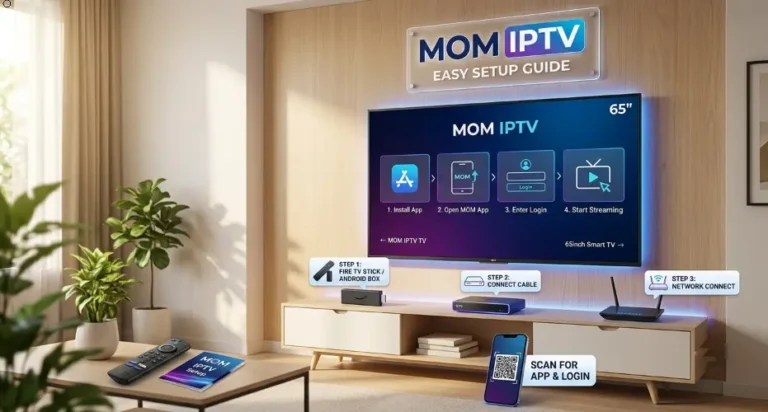
Not sure if you're ready to install MOM IPTV? Don't worry — the requirements are minimal and easy to gather in minutes. Here's what you'll need: an active MOM IPTV subscription (available directly from the official MOM IPTV website), your Xtream Codes login details or M3U playlist link, and a fast, stable internet connection of at least 10 Mbps for HD or 25 Mbps for 4K. Next, confirm your streaming device is compatible — MOM IPTV works on Firestick, Android TV, Smart TV, PC, Mac, iOS, and MAG Box. Finally, install a supported IPTV player app such as TiviMate or IPTV Smarters Pro, and you'll be ready to enjoy thousands of live channels and VOD content instantly.
Before you start the MOM IPTV installation, make sure you have an active MOM IPTV subscription. After purchasing your plan, you will receive your Xtream Codes credentials (username, password & server URL) or your M3U playlist URL directly by email. Keep these details handy — you will need them during the setup process to activate and access all your channels instantly.
A fast and stable internet connection is essential for the best MOM IPTV streaming experience. We recommend a minimum speed of 10 Mbps for HD streaming and at least 25 Mbps for smooth 4K Ultra HD playback. For the most reliable connection, use a wired Ethernet cable instead of Wi-Fi whenever possible. A weak or unstable connection may cause buffering, freezing, or poor video quality.
MOM IPTV is fully compatible with a wide range of devices including Firestick, Android TV Box, Samsung Smart TV, LG Smart TV, MAG Box, iOS, and PC. To get started, simply download a supported IPTV player app such as TiviMate, IPTV Smarters Pro, or GSE Smart IPTV on your device. These apps are free to install and allow you to connect your MOM IPTV subscription in just a few taps.
Setting up MOM IPTV has never been easier! Below you'll find a complete step-by-step installation guide for every major device — including Firestick, Android TV Box, Samsung Smart TV, LG Smart TV, MAG Box, iPhone, Android, PC, Mac, Roku, and Formuler. Simply select your device, follow the easy steps, and start enjoying 4K buffer-free streaming in minutes. No technical skills required — our 2026 setup guides are designed for complete beginners and advanced users alike.
Step 1 — Enable Unknown Sources
Go to Settings → My Fire TV → Developer Options → Turn on Apps from Unknown Sources
Step 2 — Download Downloader App
Go to the Search bar → Type "Downloader" → Install the official Downloader app by AFTVnews
Step 3 — Install IPTV Smarters Pro
Open Downloader → Enter the IPTV Smarters Pro APK URL → Download & Install the app
Step 4 — Enter MOM IPTV Credentials
Open IPTV Smarters Pro → Select Xtream Codes API → Enter your Username, Password & Server URL → Click Add User
Step 5 — Start Streaming
Your channels will load automatically → Enjoy 4K buffer-free streaming on MOM IPTV ✅
Step 1 — Enable Unknown Sources
Go to Settings → Security → Enable Unknown Sources or Install Unknown Apps
Step 2 — Download IPTV Smarters Pro
Open Google Play Store → Search "IPTV Smarters Pro" → Download & Install
Step 3 — Enter MOM IPTV Credentials
Open the app → Select Xtream Codes API → Enter Username, Password & Server URL
Step 4 — Start Streaming
All channels load instantly → Enjoy HD & 4K streaming on MOM IPTV ✅
Step 1 — Enable Developer Mode
Go to Smart Hub → Apps → Press 12345 on remote → Enable Developer Mode → Restart TV
Step 2 — Install Smart IPTV App
Go to Apps → Search "Smart IPTV" or "IPTV Smarters" → Install the app
Step 3 — Add MOM IPTV Playlist
Open the app → Go to Settings → Enter your M3U Playlist URL or Xtream Codes
Step 4 — Start Streaming
Channels load automatically → Enjoy 4K Smart TV streaming on MOM IPTV ✅
Step 1 — Open LG Content Store
Press Home on remote → Open LG Content Store → Go to Apps
Step 2 — Install IPTV App
Search "SS IPTV" or "GSE Smart IPTV" → Download & Install
Step 3 — Enter MOM IPTV Details
Open the app → Select M3U URL or Xtream Codes → Enter your credentials
Step 4 — Start Streaming
All MOM IPTV channels load instantly → Enjoy Full HD & 4K streaming ✅
Step 1 — Access MAG Box Settings
Go to Settings → System Settings → Servers → Portals
Step 2 — Enter MOM IPTV Portal URL
In Portal 1 URL → Enter your MOM IPTV Portal URL provided after subscription
Step 3 — Save & Restart
Click OK → Restart your MAG Box device
Step 4 — Start Streaming
MOM IPTV loads automatically on startup → Enjoy all channels ✅
Step 1 — Open App Store
Go to App Store → Search "IPTV Smarters Pro" or "GSE Smart IPTV" → Install
Step 2 — Enter MOM IPTV Credentials
Open the app → Tap Add User → Select Xtream Codes API → Enter Username, Password & Server URL
Step 3 — Start Streaming
All channels load instantly → Stream MOM IPTV on your iPhone or iPad ✅
Step 1 — Download IPTV Smarters Pro
Open Google Play Store → Search "IPTV Smarters Pro" → Install
Step 2 — Enter MOM IPTV Credentials
Open app → Select Xtream Codes API → Enter Username, Password & Server URL
Step 3 — Start Streaming
Channels load automatically → Enjoy MOM IPTV on your Android phone ✅
Step 1 — Download VLC Media Player
Go to vlc.org → Download & Install VLC Media Player for Windows
Step 2 — Open MOM IPTV Playlist
Open VLC → Click Media → Open Network Stream → Enter your M3U Playlist URL
Step 3 — Start Streaming
All channels load inside VLC → Enjoy MOM IPTV on your PC or laptop ✅
Step 1 — Download IPTV Player
Go to App Store → Search "IPTV Smarters" or download VLC for Mac
Step 2 — Enter MOM IPTV Details
Open app → Enter your M3U URL or Xtream Codes credentials
Step 3 — Start Streaming
All channels load instantly → Enjoy MOM IPTV on your Mac ✅
Step 1 — Add Private Channel
Go to roku.com/add on your browser → Enter MOM IPTV Roku Channel Code
Step 2 — Install IPTV App
On your Roku device → Go to My Channels → Open the installed IPTV app
Step 3 — Enter MOM IPTV Credentials
Enter your M3U URL or Xtream Codes login details
Step 4 — Start Streaming
All channels load automatically → Enjoy MOM IPTV on Roku ✅
Step 1 — Open MytvOnline App
Press Home → Open MytvOnline 2 app (pre-installed on Formuler)
Step 2 — Add MOM IPTV Portal
Go to Portal Management → Tap Add → Enter your MOM IPTV Portal URL
Step 3 — Save & Connect
Save settings → Select MOM IPTV portal → Connect
Step 4 — Start Streaming
All channels load instantly → Enjoy 4K streaming on Formuler ✅
Choose the perfect MOM IPTV subscription plan for you. 1 Month, 3 Months, 6 Months, or 1 Year — all plans include 25,000+ channels, 4K streaming, and a 7-day money-back guarantee. Limited time pricing available now.
Experiencing issues with your MOM IPTV service? Don't worry — most problems are easy to fix in just a few minutes. Below you'll find the most common MOM IPTV issues and their solutions, along with expert optimization tips to guarantee a smooth, buffer-free 4K streaming experience on any device.
Problem 1 — MOM IPTV Buffering or Freezing
Cause: Slow internet connection or server overload ✅ Check your internet speed — minimum 25 Mbps for 4K ✅ Switch from Wi-Fi to Ethernet cable ✅ Restart your router and streaming device ✅ Change your IPTV player buffer settings to 10,000ms ✅ Contact MOM IPTV support to switch to a faster server
Cause: Wrong credentials or expired subscription ✅ Double-check your Xtream Codes / M3U URL ✅ Make sure your subscription is still active ✅ Clear app cache → Settings → Apps → Clear Cache ✅ Uninstall and reinstall your IPTV player app ✅ Try a different IPTV app (TiviMate / IPTV Smarters)
Cause: Outdated playlist or server maintenance ✅ Refresh your M3U playlist inside the app settings ✅ Wait 10–15 minutes — server may be under maintenance ✅ Check if the channel is available in your subscription plan ✅ Contact MOM IPTV support for an updated playlist URL
Cause: Outdated app version or device storage full ✅ Update your IPTV player app to the latest version ✅ Free up device storage — delete unused apps ✅ Restart your device completely ✅ Reinstall the IPTV app from scratch
Cause: Low internet speed or wrong stream quality settings ✅ Switch stream quality to HD or 4K inside app settings ✅ Upgrade your internet plan to minimum 25 Mbps ✅ Use Ethernet cable instead of Wi-Fi ✅ Close all background apps on your device
Cause: EPG URL not configured or outdated ✅ Go to app Settings → EPG / TV Guide ✅ Enter your MOM IPTV EPG URL provided after subscription ✅ Force refresh the EPG inside the app ✅ Wait up to 24 hours for EPG to fully update